








Building AI Agents for the Web

The Founding Cohort · Build Your Web Agent in 4 Weeks · 50% off

In four weeks, build an AI agent that uses any website. Even the ones built to keep it out.

Four live lessons, and office hours with me every week on your own project. You build your own agent, for the web apps you actually use, doing your real work. By week four it gets past pages built to stop it, and repairs itself when the site changes. And you keep the skills to build every agent after it.

Founding bonuses end Saturday, November 14, at midnight US CST

A skill card · tap to turn it over
4 weeksstarting Wednesday, November 18
4 live lessons90 minutes each
6½ hoursof office hours with me, on your own project
2 guaranteesevery dollar back before lesson 3, or help until your agent works
400,000+people taught, online and in the classroom

The course grew from The Dark Arts of Web Automation, my talk at AI Engineer World's Fair 2026, watched more than 28,000 times.

Your agent, by week 4

One project, start to finish, the way your agent will do it.

01 · Operating the page

Your agent reads the page, then works it the way you do.

It reads every field and button, listens to what the page sends, then opens a new message, clicks, types and attaches, checking each field as it goes.

Lesson 1 · Operating the page

02 · Where lesson 1 ends

Your agent works. It's also slow.

About 20 seconds a reply, so 500 personalized replies would take nearly three hours.

End of lesson 1 · the problem lesson 2 solves

03 · Using the session

Your agent finds the API behind the buttons.

Outlook sends one request to send a reply, and your agent makes that same request through your logged-in session: clicking is still on reply 3 when the API has finished all 500.

Lesson 2 · Using the session

04 · Where lesson 2 ends

Halfway through, a CAPTCHA.

The site asks whether you're human, and the job stops dead.

End of lesson 2 · the problem lesson 3 solves

05 · When the page fights back

Your agent gets past the checks, one level at a time.

It reaches a checkbox hidden where ordinary code can't find it, reads distorted text and types it, and drags a puzzle piece the way a hand would.

Lesson 3 · When the page fights back

06 · The final level

Code does the clicking. The model only looks.

Plain code handles every click and every second of timing, and the AI model is asked only which pictures match, fast enough to beat the clock.

Lesson 3 · When the page fights back

07 · Keep it alive

Weeks later, the site changes. Your agent repairs itself.

A button is renamed overnight. The check before the run catches it, your agent repairs itself within the rules you set and records what changed, and the job keeps running with nobody watching.

Lesson 4 · Keep it alive

08 · After four weeks

Email was the teaching example.

Here's where the same skills go next.

Lessons 1–4
outlook.live.com · your account

Skill cards earned along the way

Real clicksCheck it really workedBehind the buttonsFaster than the interfaceOut of reachWhy didn't it work?Beat the clockChecks firstSelf-healing

Where the skills go next

The same skills, beyond email.

Lesson 1 · Operating the page

Real clicks and keystrokes work on any web app, not just Outlook.

Amazon · Add to Cart

Amazon · Add to Cart

Amazon's Add to Cart ignores a fake click and the cart stays empty; a real click works.

GitHub profile pages

GitHub profile pages

GitHub profile pages turned away plain requests and the usual automated browsers; a real Chrome, driven properly, got through.

X and LinkedIn posts

X and LinkedIn posts

The post boxes on X and LinkedIn, and LinkedIn's @mention list, only respond to real keystrokes.

Lesson 2 · Using the session

Any app you're logged into has an API behind its buttons.

Gmail

Gmail

The same job on Gmail works differently: no login token is needed, but it blocks a common way of reading the page, so you learn to check each app before you assume.

DocSend decks

DocSend decks

DocSend decks come down through the app's own requests, and what you keep is a tool you can run again.

Snipd → Pocket Casts

Snipd → Pocket Casts

Podcast subscriptions move from Snipd to Pocket Casts through both apps' own APIs, a job neither app's screens can do.

Lesson 3 · When the page fights back

The same checks stand in front of sites you're entitled to use.

A public-records portal

A public-records portal

A city's public-records portal puts checks in the way of a request you're entitled to make.

A LinkedIn carousel upload

A LinkedIn carousel upload

Posting a carousel to LinkedIn means getting past an overlay in the way, page elements with scrambled names, and an upload with no file picker.

What a site can see

What a site can see

Measure exactly what a website can see about your browser, before it decides whether you're a bot.

Lesson 4 · Keep it alive

Anything that has to run for months needs to repair itself.

Chicago tech events

Chicago tech events

A weekly Chicago tech-events calendar that keeps running, week after week, with nobody watching.

LinkedIn · Connect

LinkedIn · Connect

LinkedIn invitations that stay within the site's limits: its “unusual activity” check and its weekly invitation cap.

An expired login

An expired login

The breaks that actually happen: a login that expires, and Outlook answering on two different web addresses.

And anything like it.

A CRM with no usable API, reports pulled from a dashboard, a records portal you're entitled to use, a nightly sync between two systems. And anything else on the web.

Optional · pick any that apply

What brings you here?

Whichever it is, you spend the four weeks on your own agent, on the apps you use, with me on your project every week.

Does this sound familiar?

You pointed an agent at a real website, and:

What happenedWhat you'll learn to doWhere
It clicked the button, said it worked, and nothing happened.Make clicks and keystrokes the page accepts as real, and check that each one landed.Lesson 1
You couldn't see what it was doing, so you wrote paragraphs explaining what you wanted.Work in the same browser as your agent, and show it what to do instead of describing it.Lesson 1
It started from scratch every run, and cost you every time.Figure it out once, then run it forever as plain code.Lessons 1–2
It took a minute and a dollar to fill in one form.Do the same job in seconds, through the app's own API, logged in as you, with no password in any code.Lesson 2
A CAPTCHA, a “verify you're human” page or a bot check ended the run.Get past the checks built to stop it, including the four CAPTCHAs from the talk.Lesson 3
The model was too slow, too expensive, or refused.Let plain code do the driving, and the model only the judging.Lesson 3
It worked last week. Then the site changed.Make it notice the change and repair itself.Lesson 4

Not theory: in the talk, these methods got an agent through all four CAPTCHAs live, on stage. Watch the finale →

Reviews of my teaching

“Relatively advanced… very easy to follow.”

Joakim Henriksson · Coursera

Reviews from the Coursera courses I've taught to more than 400,000 learners, and comments on my talks.

“I work at a fortune500 big tech security company that builds technology to block bots and scraping… Your recommended approach defeats >95% of anti-bot mechanisms easily — great work!”
YouTube comment on my Dark Arts talk
“This was a great, straight to the point, presentation. I will def be trying this.”
YouTube comment on my Dark Arts talk
“Fantastic course - I'm using it in my work already.”
Ryan Scott Kennedy · Coursera
“One of the most useful courses I have taken. Skills immediately applicable on any job that requires data analysis.”
Faris Samawi · Coursera
“very practical skills can be used in the consulting field immediately”
Yi Hou · Coursera
“great exercises! We learn by solving real-world problems.”
Wentao Yuan · Coursera
“Great course. Extremely valuable - and I have already started applying what i have learned.”
Jessica Burdman · Coursera
“Thorough and thoroughly enjoyable. Plenty to take away as long as you put it into practice!”
Avais · Coursera
“This is the most practical Coursera course I have ever done. …”
Nitin Raj B M · Coursera
“…the ability to practice what i learnt right away and apply it to a business context is what i liked the most from this course.”
Nisarg Tripathi · Coursera
“Amazing course, with great insights that I applied to my job soon after taking it.”
Mohammed Ali · Coursera
“The course is highly practical and effective in applying abstract concepts in real world applications. The course is direct and clean.”
Kelvin Araujo · Coursera

After four weeks

When your team says an agent can't use that site, you're the one who makes it work.

Build agents for any web app.

Your agents use the web apps you use, including the ones built to keep agents out.

Work alongside it.

It works in the same browser you do. Show it what needs doing instead of describing it. When a page fights back, you know exactly why, and what to do next.

Leave it running.

It does your real work on its own, and it's self-healing: when a site changes, it notices, repairs itself, and keeps going.

Your first win comes in week one. By the end of lesson 1, your agent sends real replies from an Outlook account of your own, checking every field as it goes.

The collection

A card for every skill you prove. The certificate for the core set.

Each card stands for a skill you can now use, and you earn it with an agent you've built, in a challenge that checks the result itself. The core cards earn the certificate. Harder optional cards, and hidden ones you find only by building, complete the collection.

What a skill card is

The moment it works, it's yours.

A skill card is proof of a skill, in your name. It marks the day something you built passed a test no one could pass by hand, and anyone can check it.

  • The first comes before lesson 1. You earn a starter card during setup, the first time your agent runs for real.
  • Each lesson opens new cards. When your work passes, the card turns over.
  • Your collection shows every space still to fill. Complete the core and the certificate is yours. Optional cards are harder, for when you want to go further.
  • Some cards are hidden, and they change every cohort. You find one when something you built handles what no lesson warned you about.
  • First Edition and Perfect. First Edition, in silver, is for founding students who enroll by November 14, and it's never issued again. Perfect, in gold, is for passing every check on the first try. Make every core card Perfect and your certificate is Perfect too.
  • Yours to show. Each card has its own page, like agentsfortheweb.com/c/7Q4K-29MX, and a code no other card shares. Your collection has its own page too, and you can post any card to LinkedIn.

Your collection

Earned by building, not by showing up.

Every result is checked by the course's own servers, or by the CAPTCHA provider's, and no challenge can be passed by hand, so a card means you built something that works. The four CAPTCHAs from the talk are here too, each one a route to a card.

Tap or click any card to turn it over

Core · for the certificateOne for each skill the lessons teach

Starter · before lesson 1

Optional · part of the collection

Hidden · found by building

First Edition · enrolled by November 14Every card face down until you earn it

The certificate

Your name, and exactly what you can do.

Earn the core cards and the certificate is yours, signed by me, with a citation stating what you can now build. It has its own page anyone can check, and you can add it to your LinkedIn profile.

Make every core card Perfect and the certificate is Perfect too.

The most-asked question since the talk

Build what solved the CAPTCHAs in the talk

Since The Dark Arts of Web Automation, people have been asking me for the code that solved the CAPTCHAs on stage. In this course you build the same approach into your own agent, step by step, and practice it on the course's CAPTCHA site, where the provider's server checks every solve.

1

Cloudflare Turnstile

Reaching a checkbox that ordinary code can't find.

Earns the Out of reach card

2

MTCaptcha

Reading distorted text with vision, and typing like a person.

Earns the Reads the screen card

3

Lemin

A drag that has to move like a human hand.

Earns the Moves like a person card

4

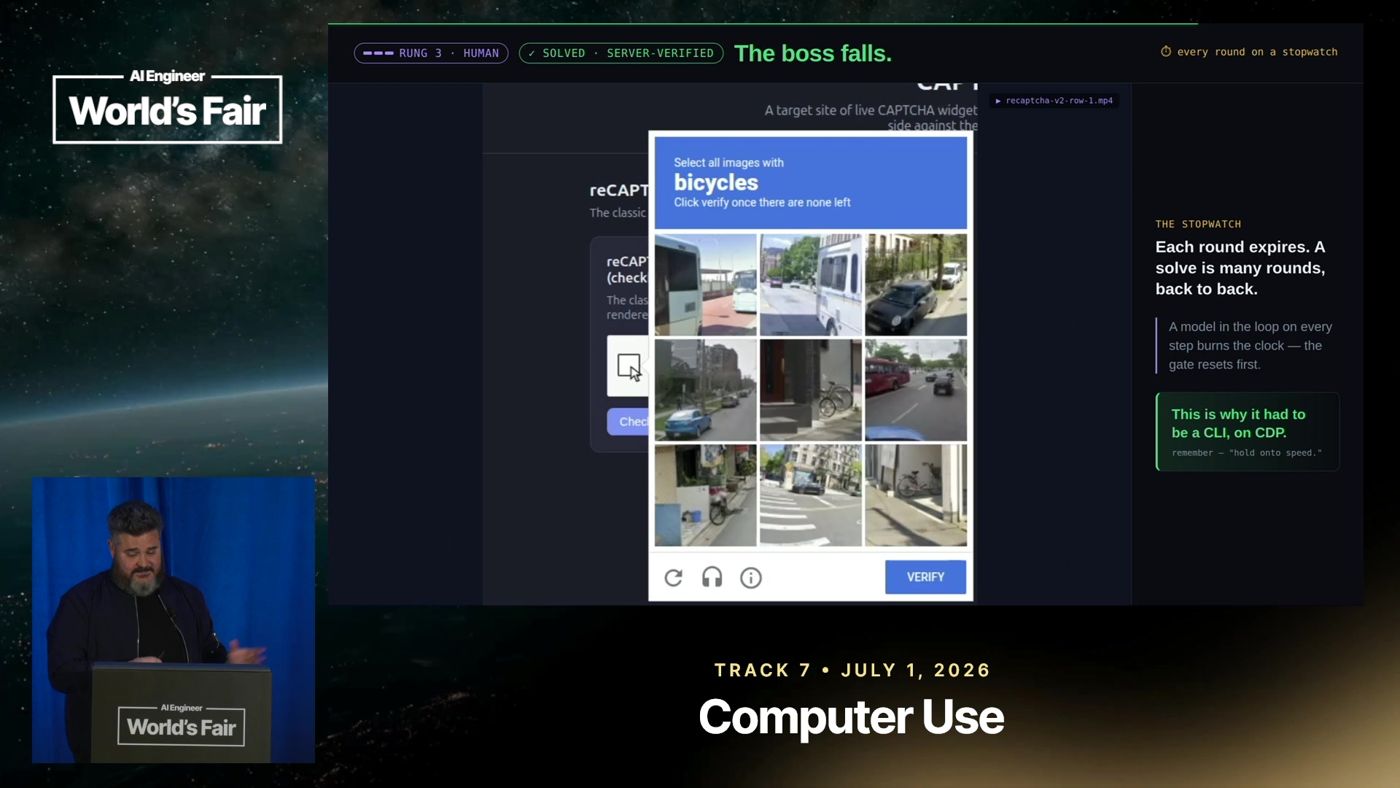
reCAPTCHA v2, the final boss

Plain code does the clicking and the timing; the AI model only looks at the pictures. Fast enough to beat the clock, round after round.

Earns the Beat the clock card

The boss falls: reCAPTCHA v2 solved live on stage at AI Engineer World's Fair 2026 From 18:29
The boss fight, live on stage, verified by the CAPTCHA provider's own server.

Your project

Your own agent, for the apps you actually use.

It's your project for all four weeks, and it grows every week.

Week 1

It drives the app the way you do, clicking and typing.

Week 2

It skips the buttons and talks to the app's own API directly.

Week 3

It gets past pages built to stop it, CAPTCHAs included.

Week 4

It becomes self-healing, and keeps running when the site changes.

You won't build it alone: office hours are where your project gets unstuck.

No project yet? Starter projects are provided.

The four lessons

Each week, a new problem, and the skills that solve it.

Lessons Wednesdays 7pm US CST (5pm US PST). Office hours Saturdays 4pm US CST (2pm US PST). No lesson in Thanksgiving week, but office hours still run that Saturday, November 28: a bonus session for the founding cohort.

Lesson 1 · Wednesday

Nov 18

Operating the page

How do I do from code what I just did by hand?

Your agent learns to use a web app the way you do: clicking, typing, reading the page, and checking that each step really happened. By the end, it sends personalized replies from an Outlook account of your own, checking every field as it goes.


Cards you can earn this week: Real clicks · Check it really worked
The full agenda for lesson 1 · 90 minutes
  1. The whole gameThe finished program sends several emails from the course mailbox, so you see where the lesson ends before anything is explained.
  2. What CDP really isSlides from the talk: the protocol Chrome uses to be controlled from outside, every part of it on one slide, then grouped into categories.
  3. CDP with nothing but curlFind and control a running Chrome using nothing but plain web requests typed into the notebook. No libraries.
  4. Build a tiny CDP clientBuild a small program that talks to Chrome, step by step, using exactly the commands the email job will need.
  5. Switch to chrome-agentRun the same commands through chrome-agent, and see what a real tool adds over the small one.
  6. The agent's sensesHow an agent senses a page: sight (screenshots, reading the page), hearing (network traffic, console), touch (clicks, keys, paste, drag). React to what it senses; never wait and hope.
  7. The handoffLog in to the course mailbox by hand in the agent's browser. From then on, code and agent can both use that logged-in session.
  8. Write and send an email by hand, through CDPFind each part of the compose window in DevTools, then fill it in and send an email from the notebook.
  9. The agent builds the reusable program, side by sideA replay of an agent writing a reusable program for this job, shown beside the steps just done by hand.
  10. The whole game, againThe finished program sends its emails again. This time you understand every part of it.
  11. Short videos: the same skills elsewhereShort recorded videos of the same skills used on other sites.
  12. HomeworkThis week's work on your own project, and the skill cards to earn.
  13. Next week's problem: it's too slowA timer shows the program takes about twenty seconds per email: hours for a real job. Next week fixes it.


Lesson 2 · Wednesday

Dec 2

Using the session

Why use the interface at all?

Behind the buttons, most web apps talk to their own server through an API. Once you're logged in, your agent can use it too. Same job as lesson 1, so much faster we run both side by side.

Cards you can earn this week: Behind the buttons · Faster than the interface
The full agenda for lesson 2 · 90 minutes
  1. Your homework, talked throughI talk through two or three lesson 1 homeworks that students sent in.
  2. The whole game: the same job, two waysThe same emails sent twice, side by side: by clicking, and through Outlook's own API. Then a slide on when each one is the right tool.
  3. The browser is an authenticated clientWhy a logged-in browser can use the app's own API at all.
  4. Find the APISend one email by hand with DevTools open and watch the single request Outlook makes to its server.
  5. The credentialFind where Outlook keeps your login token, and use it the way Outlook does.
  6. Staying logged in, safelyHow an agent stays logged in over time without a password in any code.
  7. Do it yourself: send an email through the APISend an email through the API from the notebook, and learn the errors that look like permission problems but are mistakes.
  8. The agent builds the reusable API client, side by sideA replay of an agent turning those calls into a reusable program, beside the calls just made by hand, with tests against the real app.
  9. A second job: reading emailThe program learns to read mail and save attachments. And reading through the API leaves mail unread; clicking through the page marks it read.
  10. The whole game, againBoth ways again, now understood.
  11. Short videos: the same skills elsewhereShort recorded videos of the same skills used on other apps.
  12. HomeworkThis week's work on your own project, and the skill cards to earn.
  13. Next week's problem: it gets blockedHalfway through a job a CAPTCHA appears and the agent stops dead. Next week it gets through.

Lesson 3 · Wednesday

Dec 9

When the page fights back

What do I do when the cheap thing stops working?

Your agent learns how pages tell a person from a bot and what a website can see about your browser, then clears the four CAPTCHAs from the talk, one level at a time.

Cards you can earn this week: Out of reach · Why didn't it work? · Beat the clock
The full agenda for lesson 3 · 90 minutes
  1. Your homework, talked throughI talk through two or three lesson 2 homeworks that students sent in.
  2. The whole gameThe agent clears all four CAPTCHAs from the talk in a row, each confirmed by the CAPTCHA provider's own server.
  3. Why pages fight backThe ladder from the talk, and how a page tells real input from fake.
  4. What a website can see about your browserMeasured live: what bot-detection pages can see about the agent's browser, and the surprising things that give it away.
  5. Level 1: Cloudflare Turnstile. ReachA checkbox hidden where ordinary code can't find it, clicked anyway. Plus the four failures that look exactly the same.
  6. Level 2: MTCaptcha. Sight, then touchRead distorted text with vision, then type it the way a person would.
  7. Level 3: Lemin. Moving like a personDrag a puzzle piece with movement that looks like a human hand.
  8. Why the obvious approach failsA replay of a slow agent losing to the CAPTCHA's timer, round after round.
  9. The agent builds the reCAPTCHA solverA replay of an agent building the reCAPTCHA solver, beside a tour of its code.
  10. The solver runsThe solver beats reCAPTCHA live. Then: build with a strong model, run with a lighter one.
  11. The whole game, againAll four again, now understood.
  12. Short videos: the same checks elsewhereShort recorded videos of the same skills on sites you're entitled to use, like a public-records portal and a LinkedIn upload.
  13. HomeworkClear all four levels on the course's CAPTCHA site with your own agent.
  14. Next week's problem: it breaks, and nobody tells youA program that has been failing silently for three days because a site renamed one thing. Next week it repairs itself.

Lesson 4 · Wednesday

Dec 16

Keep it alive

How does this survive the site changing?

Self-healing agents notice when a site has changed and repair themselves. We break your programs on purpose and watch them heal.

Cards you can earn this week: Checks first · Self-healing
The full agenda for lesson 4 · 90 minutes
  1. Your homework, talked throughI talk through two or three lesson 3 homeworks that students sent in.
  2. The whole game: it breaks, notices, repairs itself, and finishesThe week-2 program runs, breaks, notices what broke, repairs itself, and finishes.
  3. Why automations dieThe real ways automations break: expired logins, renamed buttons, a site moving address.
  4. Evidence firstLogs worth reading later, and a failure report that records everything known at the moment something broke.
  5. Pre-flight checks, built by handChecks on everything the program depends on, run before every job, built by hand. Then break the site on purpose and watch them catch it.
  6. Letting an agent fix your code safelyThe rules that make it safe to let an agent edit your code unattended: what it may change, how many tries it gets, how you find out.
  7. The agent builds the self-healing loop, side by sideA replay of an agent building the self-healing loop, beside the pieces built by hand.
  8. It healsA replay of a repair: the break, the checks, the agent's fix, the job finishing.
  9. Running unattendedKeeping a program polite and resilient over time: rate limits, backing off, resuming where it stopped.
  10. The whole game, againThe self-healing program again, now understood.
  11. Short videos: self-healing systems already runningShort recorded videos of self-healing systems already running.
  12. HomeworkMake your own program self-healing, and earn the Self-healing card.
  13. What's nextYour agent, running on its own.

How it runs

Four weeks, working with me

Every week

Wednesday, 7pm US CST

The live lesson. 90 minutes on Zoom. You watch real agents work, see exactly how they were built, and leave with the week's new skill.

Between sessions

You build

You put the skill to work on your own agent, earn that week's skill cards, and compare notes with the group in the forum.

Every week

Saturday, 4pm US CST

Office hours. 90 minutes with me on your project, two hours in the final week.

$2,500 an hour

The same advice my clients pay $2,500 an hour for.

Every Saturday, bring what you're building and we work on it together: your apps, your agent, whatever stopped you that week. Six and a half hours of it across the four weeks, included, plus a bonus session for the founding cohort on Saturday, November 28.

Your instructor · Corey Gallon

Learn to build web agents from someone whose businesses run on them.

I've built agent systems for some of the largest companies in America, and the businesses I run at Rexmore depend on agents I build, including agents that work on websites every day.

I've taught for more than a decade.

400,000+

learners on Coursera, rated 4.6 out of 5 from more than 11,000 reviews

11 years

in undergraduate and graduate classrooms at Loyola University Chicago

This course takes the methods from my talk The Dark Arts of Web Automation and turns them into an agent of your own, working on your own project, in four weeks.

How I got here

As a teenager

The first scraper

I was selling shipping supplies by cold calling, and the company's leads were terrible. So I wrote scripts that crawled the websites of computer-parts marketplaces for every seller's contact details, and became the top salesman by a wide margin. It was my first taste of what this course teaches: when what you need is on a website, code can go and get it, faster and more thoroughly than anyone working by hand.

2006–2011

PwC

As a management consultant in quantitative finance, I built valuation, risk and pricing models for financial services clients, and the automated data pipelines that fed them, from raw data to checked results. Clients made big-dollar decisions on those numbers, so the costliest mistake was a wrong answer that looked right. That's why, in this course, your agent checks every action in code and never reports a success it can't prove. It also checks everything it depends on before each run, so it can work with nobody watching.

2011–2014

Co-founded an algorithmic brokerage

I was one of five founders of an agency-only institutional broker-dealer: a partner, its head of finance, and a board member. I built important parts of its technology, from the finance systems to complex trading analytics systems, where our networks sat inside exchange data centers and microseconds counted. In that business, a system that fails quietly loses money before anyone notices, which is why lesson 4 teaches you to build self-healing agents that catch a failure and fix it, whether it's in the code or in a step the model handles.

2014–2025

Eleven years teaching at Loyola University Chicago

I was founding faculty of its graduate machine learning program, and for many years my practicum course taught web scraping and automation. In my capstone course, student teams applied machine learning to real problems for companies like Groupon, Anthem and Gallagher Bassett, and I advised each team on applying what they'd learned to their own project. Office hours in this course work the same way: you bring your own project, and I help you apply each lesson to it.

2015

Back to PwC

PwC recruited me back to build its machine-learning practice in finance, which I led for four years. From 2021, as Chief Product Officer for Accelerators, I built the software its consulting business ran on: plain, dependable automation, with AI only where it earned its place. That's the balance of code and AI your agent will have.

2016

Teaching on Coursera

I designed PwC's five-course data analysis specialization on Coursera, led the team that built it, and taught it, for learners at every level. Making a complex subject easy to follow is the principle behind all my teaching. In this course, that's why you do each thing by hand before you automate it, and see the whole agent working before we build it piece by piece.

2023–2024

GPT Engineer

I was among the largest contributors to GPT Engineer, an early and popular open-source coding agent, and served as a maintainer and on its governing board. The project became Lovable, the coding-agent company. I've been building coding agents since before most engineers had tried them, and in this course you'll learn to work with coding agents the way their builders do: knowing what they're good at, where they fail, and how to steer them.

2024

Head of Engineering Strategy, PwC Digital

I rebuilt PwC's product teams around AI. Seventeen-person teams became three: a product manager and two engineers, all working with AI and sitting with the people who'd use what they built. Users had a first version within a week or two, and their feedback was in the product within hours. Cycle times fell a hundredfold. This course runs on that same loop: a working agent in week 1, improved against your own project every week after.

2025

Chief Innovation Officer, PwC Commercial Technology

I wrote the prototype for an enterprise-scale coding-agent platform, then led small pods of PwC's strongest engineers to build it out. We also built custom agents for clients' hardest problems, in a fraction of the usual time. I lead from the keyboard, and I teach the same way: you learn from someone who's still building, every day.

2025

Rexmore

I'm Managing Director of Rexmore, a holding company whose businesses run on AI systems I build. My agents there work on real websites every day, and they hit the same walls this course teaches you to get past. Much of what you learn here keeps them running.

2025–26

Three talks at AI Engineer

In The Cure for the Vibe Coding Hangover, I showed how to build with coding agents and still understand everything they build: delegate the doing, not the thinking. In The Dark Arts of Web Automation, watched more than 28,000 times, I showed agents using websites the way people do, and open-sourced the tool behind it, chrome-agent. It's now used by engineers at Microsoft, Databricks, Red Hat, Deutsche Telekom, Bosch, Sysco, Texas Instruments, Grainger and many more. In I Believe Everything My Agents Tell Me, I showed a three-level review that makes agents' work safe to rely on, even though agents get things wrong all the time. In this course, you get all three: an agent you understand, that works on the real web, and whose work you can trust.

Clients

Everything I teach here, I've built for real, for companies like these.

Most recently, agents. In 2024 I built a multi-agent coding system that a major telecom used to modernize millions of lines of legacy COBOL: a team of four did in months what would have taken hundreds of engineers two years or more. Before that, trading technology, and the AI and machine learning models that big decisions rested on.

Sysco
Duracell
AllianceBernstein
MUFG
Fannie Mae
Boehringer Ingelheim
OneMain Financial
Cantor Fitzgerald
TE Connectivity
U.S. Bancorp
State Street
TP ICAP
CPS Energy
HP
Deutsche Bank
Zions Bancorporation
Roku
Gallagher
Northern Trust
Harvard Management Company
Huntington
RBC Capital Markets
First Horizon
KeyBank
AT&T
Susquehanna
Apollo
PNC
Walmart
Verizon
Cerberus
IHG Hotels & Resorts
Southwest
Bank of America
Comscore
Woori Financial Group
FHLBank Chicago
Sysco
Duracell
AllianceBernstein
MUFG
Fannie Mae
Boehringer Ingelheim
OneMain Financial
Cantor Fitzgerald
TE Connectivity
U.S. Bancorp
State Street
TP ICAP
CPS Energy
HP
Deutsche Bank
Zions Bancorporation
Roku
Gallagher
Northern Trust
Harvard Management Company
Huntington
RBC Capital Markets
First Horizon
KeyBank
AT&T
Susquehanna
Apollo
PNC
Walmart
Verizon
Cerberus
IHG Hotels & Resorts
Southwest
Bank of America
Comscore
Woori Financial Group
FHLBank Chicago
Sysco
Duracell
AllianceBernstein
MUFG
Fannie Mae
Boehringer Ingelheim
OneMain Financial
Cantor Fitzgerald
TE Connectivity
U.S. Bancorp
State Street
TP ICAP
CPS Energy
HP
Deutsche Bank
Zions Bancorporation
Roku
Gallagher
Northern Trust
Harvard Management Company
Huntington
RBC Capital Markets
First Horizon
KeyBank
AT&T
Susquehanna
Apollo
PNC
Walmart
Verizon
Cerberus
IHG Hotels & Resorts
Southwest
Bank of America
Comscore
Woori Financial Group
FHLBank Chicago

More from students and viewers

“…Corey, and Alex did excellent job preparing the materials as well as presenting the course. This is one of the best online courses with best practice from years of consulting experience.”
Wei Wu · Coursera
“I had an amazing experience doing this course. It brought me more clarity to my presentation approach.”
Naveen Yakkundi · Coursera
“Hands on, practical skills course delivered in a clear concise manner.”
Colin O Malley · Coursera
“Very nice course. Beautifully organized and expert instructors. Thanks a lot!”
Sonu Yadav · Coursera
“This has been the most easily understood and compelling course. …”
Ditra Ahmad Nugraha · Coursera
“… The learning experience was great and the instructors explained all the topics clearly. …”
Angelina Arini Larasati · Coursera
“High level philosophy well explained with hands on tips and tricks, very useful for client oriented works, thanks!”
Haifeng Wang · Coursera
“I enjoyed so much while learning new skills from experienced professionals throughout the course.”
Hasnain Shakeel · Coursera
“Very good course, with in-depth content - which is rare when it comes to those topics.”
Gaetan Garnotel · Coursera
“This course successfully challenged me and improved my skill in effectively communicating a narrative based on data to an audience”
Jack McKenna · Coursera
“Incredibly informative, to the point & hands on course. Highly recommended!”
Mohammad Atout · Coursera

Everything you get

What's included, and what each part is worth.

What each part would cost you to buy, to build yourself, or to book with me.

01

Your Project, With Me

6½ hours of office hours on your own project: 90 minutes every week, two hours in the final week, plus a bonus session for the founding cohort on Thanksgiving Saturday.

My consulting rate is $2,500 an hour.

$16,250

02

The Four-Week Build

Four live 90-minute lessons on Zoom.

Live AI-engineering cohorts charge $999 to $4,400. This course lists at $1,499.

$1,499

03

The CAPTCHA Practice Site

The four CAPTCHAs from the talk, set out as levels, with every solve checked by the CAPTCHA provider's own server.

Public demo pages don't confirm your solve with the provider. Building a site that does takes a day before your first attempt.

$1,000

04

The Skill Recipes

The working approach behind every card, ready for your own agent.

Saves you at least a day of working them out, and far more for reCAPTCHA.

$1,000

05

The Lesson Notebooks and Recordings

Every lesson as a notebook you can run, and every session recorded.

Yours to keep and rerun, for the price of a good recorded developer course.

$499

06

The Breaker

A tool for breaking your own program on purpose, to prove it heals.

Half a day's engineering to build yourself, and yours to use on every agent you make.

$375

07

Skill Cards and the Certificate

A challenge for every skill, each checked by the course's servers or the CAPTCHA provider's; a card for each one you pass; and the certificate, which anyone can verify.

Technical certification exams cost $150 to $445. This one is earned with agents that work.

$299

08

The Web Agent Handbook

The reading for every lesson, with short videos and examples to try.

The price of a technical book, with video where reading isn't enough.

$49

09

The Founders' Forum

A private forum for the cohort.

The people you'll keep learning with.

Included

Total value

$20,971

Everything above, added up.

List price

$1,499

What the course costs starting in January.

Founding cohort · 50% off

$749

For the founding cohort, starting November 18.

The Founding Cohort: Build Your Web Agent in 4 Weeks

Total value $20,971

was $1,499now $749

Join the founding cohort was $1,499 now $749
  • Four live lessons and 6½ hours of office hours with me, on your own project
  • The CAPTCHA practice site, the challenge app, skill cards and the certificate
  • Notebooks, recordings, recipes and the Handbook, yours to keep
  • Founding bonuses if you enroll by midnight US CST on Saturday, November 14
  • Two guarantees

Founding cohort bonuses

Enroll by midnight US CST on Saturday, November 14, the night of the free live session, and you also get:

Ends midnight US CST · Saturday, November 14

Running Before Lesson 1

A 30-minute one-to-one setup call with me, so your agent is working before the first lesson. ($1,250 of my time.)

First Look

In week-one office hours, your project goes first, ahead of anyone who enrolled after November 14.

First Edition

Your skill cards and certificate are stamped First Edition, and the stamp is never issued again.

Thanksgiving Office Hours

There's no lesson in Thanksgiving week, but you still get 90 minutes with me on your project on Saturday, November 28. ($3,750 of my time.)

Two guarantees

You'll know in two lessons. You'll leave with an agent that works.

Two guarantees cover the two things you're most likely to worry about: whether the course is right for you, and whether you'll really end up with a working agent.

Guaranteed

01

The Two-Lesson Guarantee

Tell me before lesson 3, and you get every dollar back.

Take the first two lessons. If the course isn't for you, say so. By then you've seen how I teach and your agent has done real work, so you're deciding from the inside.

Guaranteed

02

The Working Agent Guarantee

If your agent isn't doing real work by week 4, you keep coming, free, until it is.

Come to the lessons, do the homework, and come to office hours. If your own agent isn't doing real work on your own project by the end of week 4, you keep coming to office hours with the next cohort until it is.

Who it's for

For people who need agents that do real work on the web.

Engineers building AI agents

Your agents need to work on sites that were never built for them, reliably enough to leave running.

Founders and operators

You have web work you'd rather not do by hand, and you're comfortable directing a coding agent to build what you need.

The person your team turns to

When someone says an agent can't use that site, you want to be the one who makes it work.

You'll need: to be comfortable working with a coding agent, and about 4–6 hours a week. No experience automating websites is needed.

What it isn't

  • Not a demo course. Your agent does your real work, on your own project, and keeps doing it after the course ends.
  • Not something you watch. You learn by building, every week, on your own project. Every skill card and the certificate are earned by an agent that works, in a check no one can pass by hand, so turning up earns nothing.
  • Not a no-code tool. You build real code, with a coding agent, and you own every line.
  • Not a tour of frameworks. You learn what sits underneath all of them.
  • Not a testing course. Using a browser to test your own app is a different subject.
  • Not a course in breaking into anything. Your agent works as you, in your own logged-in browser, and the CAPTCHAs are practiced on a site the course owns.

Questions

FAQ

What's live and what's recorded?

Every lesson and office hours session is live on Zoom, and every one is recorded, so you can rewatch anything or catch up on what you missed.

How much time does it take each week?

90 minutes of lesson, 90 minutes of office hours (optional, but it's where your project moves fastest), and as much time on your own agent as you want to put in. All in, about 4–6 hours a week: 3 hours live, plus 1–3 hours on your project.

I'm not in the US. Can I join?

Yes. Lessons are Wednesdays at 7pm US CST, which is 1am Thursday in London and noon Thursday in Sydney, and every one is recorded. Office hours, Saturdays at 4pm US CST, are 10pm Saturday in London and 9am Sunday in Sydney.

Do I need a project?

It's best to bring one: a web app you use and work you'd rather not do by hand. If you don't have one, starter projects are provided.

What do I need?

Chrome, a coding agent you're comfortable with, Python, and a free Outlook account for the lessons' email examples. Setup instructions arrive when you enroll.

Do I need experience automating websites?

No. Lesson 1 starts from the basics, controlling Chrome with plain web requests. You should be comfortable working with a coding agent.

What if I join late?

Enrollment stays open until lesson 2. Lesson 1's recording and notebook catch you up, and office hours fill any gaps.

Is the CAPTCHA work legal?

You practice on a CAPTCHA site the course owns, with real CAPTCHAs from real providers, so every solve is on a site that allows it. On anyone else's site, your agent is bound by the same terms you are.


Can my company pay?

Yes. I can send your company an invoice.

What are the guarantees?

Two: a full refund if you ask before lesson 3, and if you've come to the lessons, done the homework and come to office hours, free office hours with the next cohort until your agent is doing real work.

When is the next cohort?

January 2027, at the list price of $1,499.

Still have a question? Email me at corey@gallon.me.

Build your web agent in four weeks, with me on your project every week.

Join the founding cohort was $1,499 now $749

Not sure yet? Come to the free live session, Saturday, November 14, at 4pm US CST. Save a seat